Deneb Design MCP
Design by talking. Your agent, our analysis.
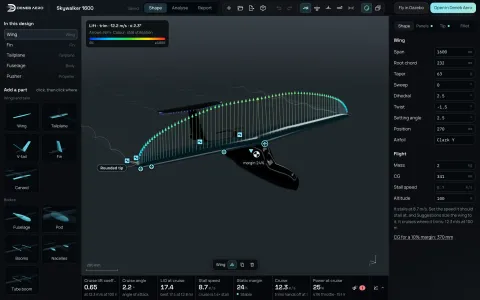
An MCP server for Deneb Design. Your AI agent creates and refines a UAV or drone design with the app’s own code: the geometry, the vortex lattice with section polars, the mass, the performance, the modes and the checks. Then it hands you a file to open in Deneb Aero.
Ask in words. Get numbers you can check.
The agent does not guess how an aircraft flies. It asks the same code the Design workspace runs, reads the numbers and the views, and changes the design until it does what you asked.

- 1
Start from a sentence
A template or the design written from scratch: wings, tails, bodies, motors, the battery and the mass.
- 2
Analyse and check
Lift and drag, stall, static margin, the dynamic modes, flight time and range, and the app’s checks with their fixes.
- 3
Open it in Deneb Aero
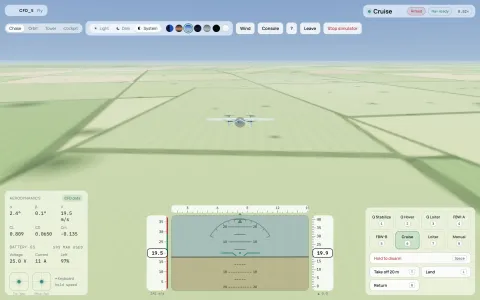
A file that opens as it was checked, to edit by hand, run in CFD or fly in the simulator.
Show it a drawing. It builds to match.
Give the agent a three-view and ask for something similar. It draws the design over your picture, view by view, and measures the match until each view reaches its target.


Four requests, four checked designs.
A UAV built to a drawing, then a survey plane at 7 kg in three steps. Every number on screen is the server’s own answer, worked out with section polars.


| Request | The design | Best L/D | Longest flight | Stall | Static margin |
|---|---|---|---|---|---|
| “Can you build something similar?”, with a three-view | 1.5 m V-tail; matches the drawing 0.999 from above, 0.945 from the side | 17.8 | 205 min | 8.6 m/s | 12.6% |
| First design | 2.4 m, conventional tail | 23.5 | 156 min | 13.1 m/s | 13.6% |
| “Make it fly longer” | 3.0 m wing, aspect ratio 15 | 26.4 | 187 min | 12.5 m/s | 12.6% |
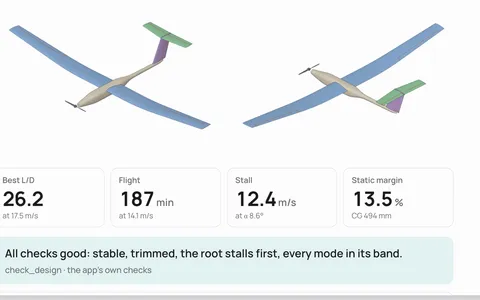
| “A T-tail for harsh landings” | Tailplane on the fin, 288 mm higher | 26.2 | 187 min | 12.4 m/s | 13.5% |
Open it in Deneb Aero, and carry on by hand.
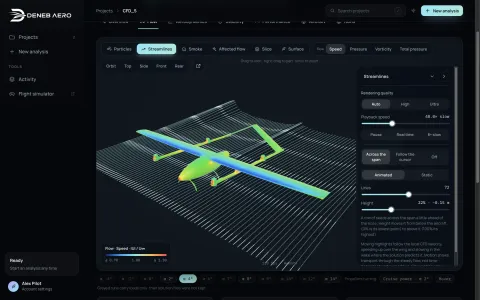
The agent’s file opens as a new design in the Design workspace. The same numbers, worked out again by the app: best L/D 26.2, stall at 12.4 m/s, a 13% static margin. Then edit it, run it in CFD or fly it.


The tools your agent gets.
Each tool takes a design and returns numbers, findings, pictures or a file. Every edit returns a new version, so the agent can compare and go back.
design_schema | The design format: units, axes, conventions and the names a design may use. |
|---|---|
list_templates, get_template | The built-in designs to start from, with their span, area and parts. |
analyze | Trim and stall, polar slopes, stability and modes, flight time, range, climb and glide, the mass. |
check_design | The app’s own checks, each finding with the fix the app would apply. |
render | Top, side, front and 3/4 views at a known scale, parts coloured by role. |
compare_reference | A drawing or photo against the design, view by view, with a match score. |
patch_design | Edits as the app makes them: spans, chords, sweep, airfoils, bodies, CG, fixes. |
save_design | A file that opens in Deneb Aero exactly as it was checked. |
parameters, features | Named parameters that drive parts, and the build order. |
hardware and print_kit | Fittings, fasteners and a printable kit with its plates and print time. |
On your computer, with the agent you use.
The server runs locally and talks to the agent over standard input and output. Nothing is hosted by us. Your agent sees what the tools return, as with any MCP server.
Any MCP client
Claude Code, Claude Desktop, OpenAI Codex, Cursor, VS Code, Windsurf, Gemini CLI or any other client that speaks the Model Context Protocol.
What it cannot do yet
Run the panel method, the Stress tab, Optimise or the CAD exports, or change a design that is open in the app: it writes a file to open.
In early testing
The MCP server is not in the download yet. Join the beta and tell us you want to try it.