Mass
The Mass step sets the loaded mass, the centre of gravity and the inertia that the flight model uses.
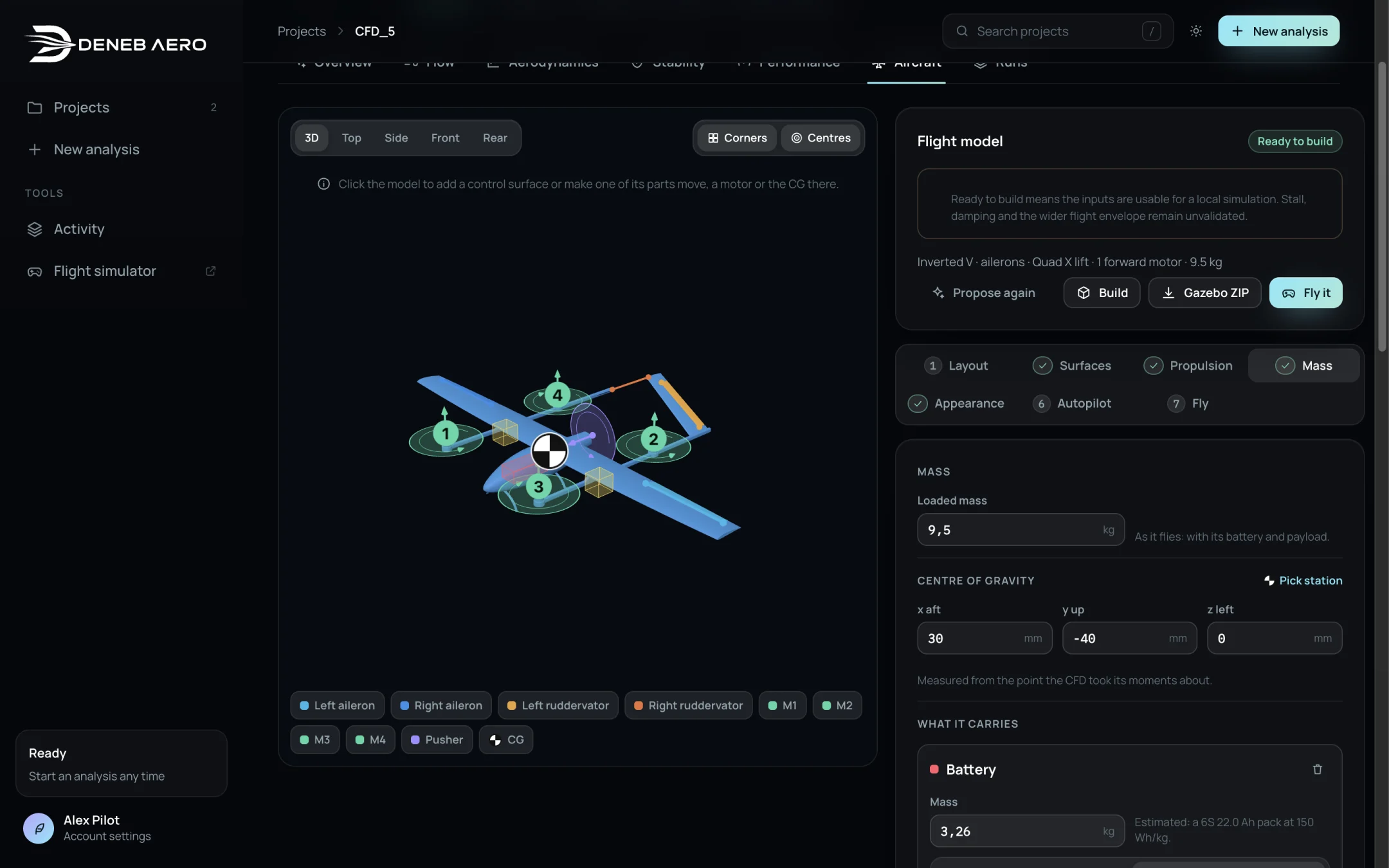
The Mass step.
- Loaded mass
The mass as it flies, with battery and payload.
- Centre of gravity
x aft, y up and z left in mm, measured from the point the CFD took its moments about. Pick station places it by clicking on the model. In the New analysis wizard the CG is the one set in the Flight step.
- What it carries
The Battery (its mass, estimated from the pack if not entered, and its position: At the CG or Placed) and Payload items such as a camera, a gimbal or a fuel tank. Each is a point mass at its centre; the battery is a box of a pack’s usual shape.
- Motors
The mass of each lift motor and of the forward motor, at the hub, with its speed controller and propeller. Estimated until entered.
- Where the mass is
A table of the battery, motors, control surfaces and the rest (structure, wiring, servos, avionics), which is spread over the skin.
- Inertia
From the parts or Measured. Roll Ixx, yaw Iyy and pitch Izz in kg·m², about the CG, in the solver’s axes (x aft, y up, z left). The autopilot’s rate gains scale with these.
Tip
If you have measured the inertia, for example with a bifilar pendulum, select Measured and enter it. The calculated values assume the structure mass is spread evenly over the skin.