Step 4: Package
In this step you choose what to compute. Each run is a full RANS solution at one attitude, meshed automatically and checked for convergence. Runs are queued and solved one after another; you can close the Studio while they run.
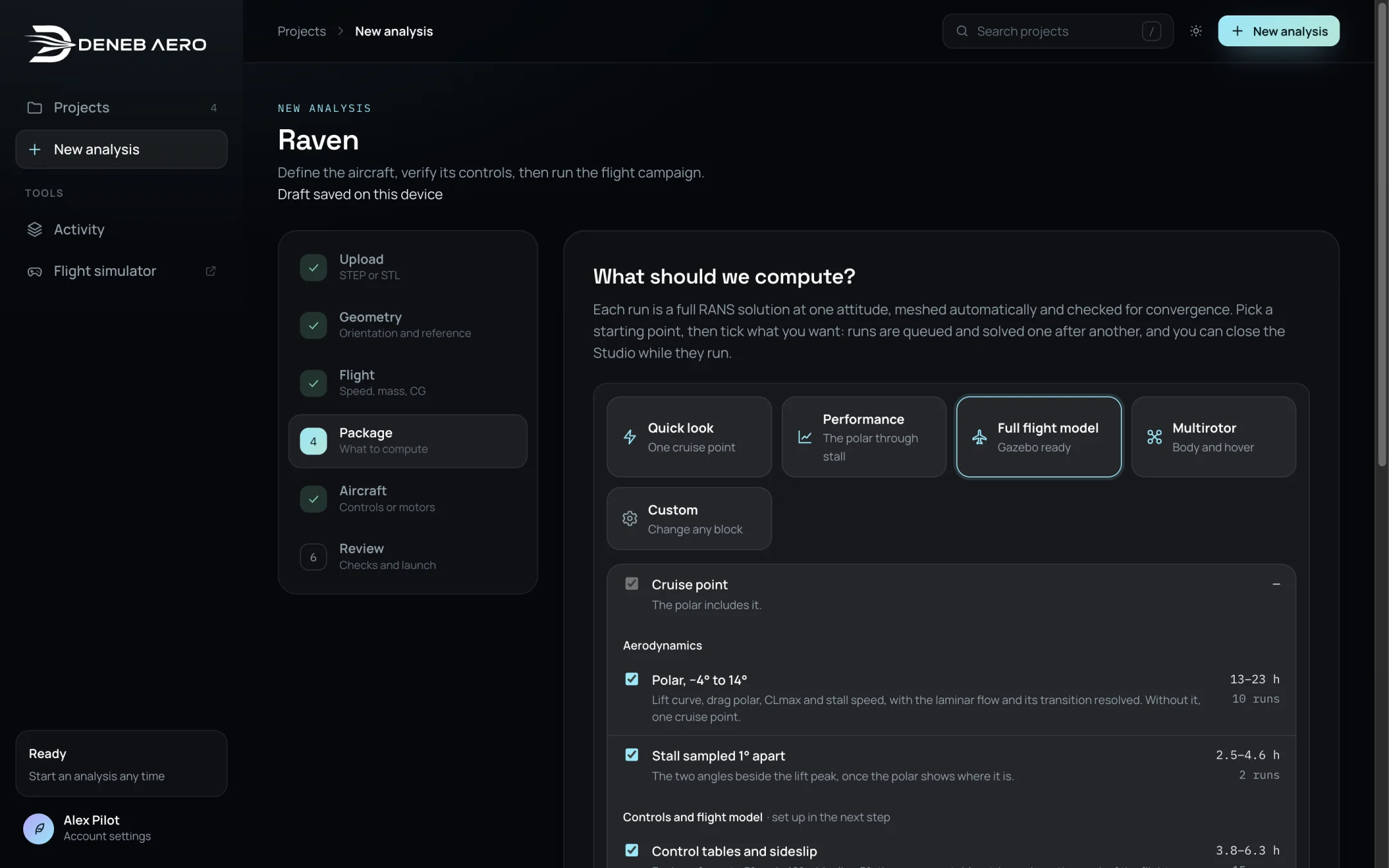
The Package step.
Starting points
Select one of the starting points at the top. It ticks the blocks below; you can then change any block, which turns the selection into Custom.
Starting point |
What it computes |
|---|---|
Quick look |
One cruise point (α 2°) with the full flow picture: lift, drag and L/D at cruise, surface pressure and streamlines, and the convergence report. |
Performance |
The polar through stall, −4° to 14°, with the laminar flow and its transition resolved: the lift curve, the drag polar, CLmax, the stall speed, best L/D, and speeds and power by mass. |
Full flight model |
Everything in Performance, plus the control response tables, trim, sideslip, the rate damping and the propellers. Produces an aircraft you can fly and a Gazebo package. Adds the Aircraft step to the wizard. |
Multirotor |
The body of a multirotor and its hover. Adds the Aircraft step for the rotors. |
Custom |
Any combination of the blocks below. |
Blocks
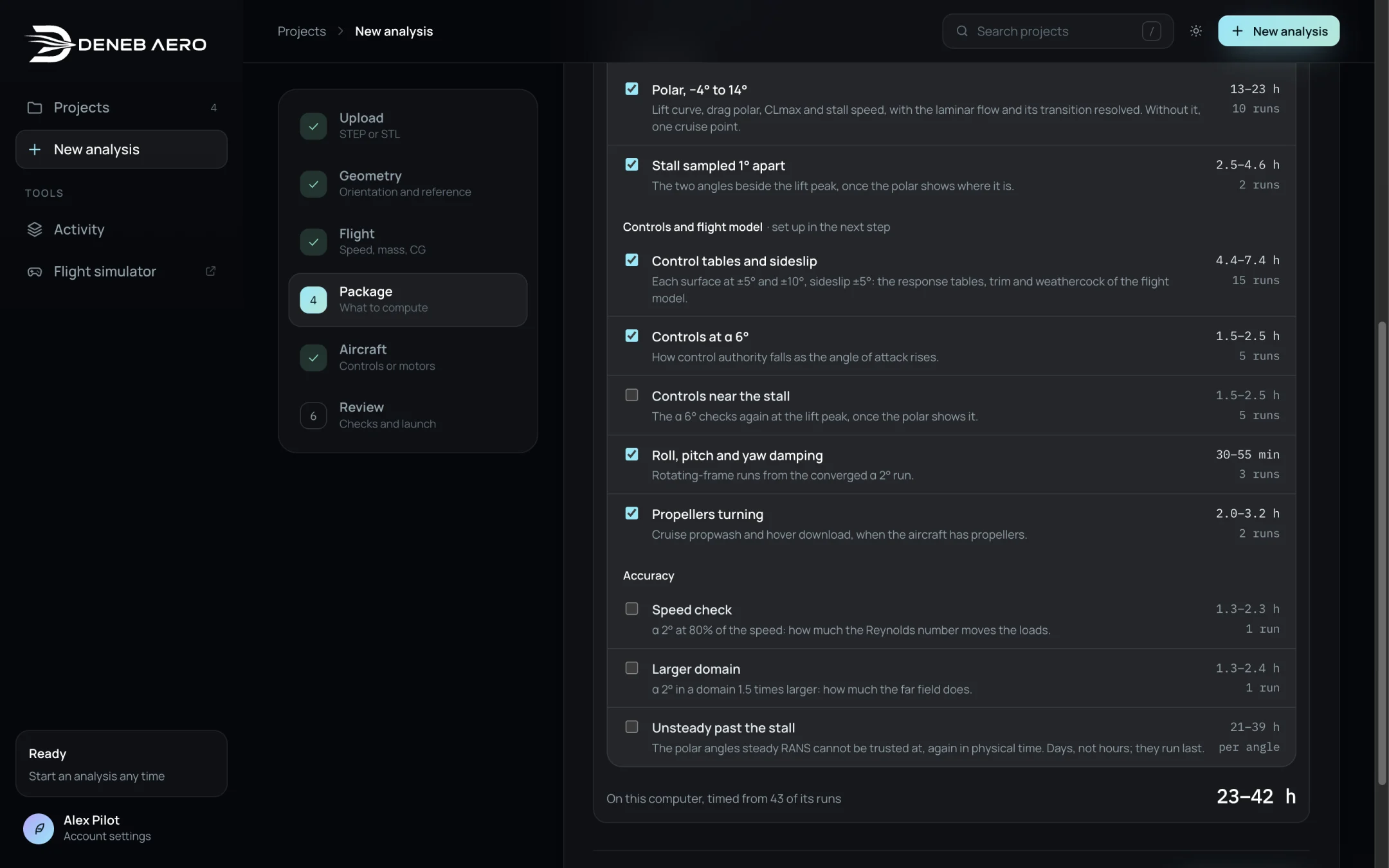
Blocks, with the number of runs and the time each takes on this computer.
Each block shows the number of runs it adds and a time range. The times are measured from the runs already solved on this computer; the line at the bottom shows how many runs they are based on and the total.
Block |
Description |
|---|---|
Cruise point |
One run at cruise. Included in the polar. |
Polar, −4° to 14° |
Ten angles of attack on the wall-resolved transition mesh: lift curve, drag polar, CLmax and stall speed. |
Stall sampled 1° apart |
The two angles next to the lift peak, queued automatically once the polar shows where the peak is. |
Control tables and sideslip |
Each control surface at ±5° and ±10°, and sideslip of ±5°: the response tables, the trim and the weathercock stability of the flight model. Set up in the Aircraft step. |
Controls at α 6° |
The controls again at a higher angle: how the control authority falls as the angle of attack rises. |
Controls near the stall |
The α 6° checks again at the lift peak, once the polar shows it. |
Roll, pitch and yaw damping |
Three rotating-frame runs started from the converged α 2° run. |
Propellers turning |
Cruise propwash and the hover download on the airframe, when the aircraft has propellers. Started automatically once the α 2° run converges. |
Speed check |
α 2° at 80% of the speed: how much the Reynolds number changes the loads. |
Larger domain |
α 2° in a domain 1.5 times larger: how much the far-field boundary affects the loads. |
Unsteady past the stall |
The angles of the polar where steady RANS cannot be trusted, solved again in physical time (URANS). Each angle takes about a day or more. They run last. |
The Speed check and Larger domain blocks are accuracy checks. Their results are kept separate from the polar. See Run Types.
Half the aircraft
Most aircraft are mirror images left to right, and so is their flow at zero sideslip. Below the blocks, Solve half the aircraft solves one side against a symmetry plane and mirrors it into the whole aircraft: each run takes about half the time and half the memory. The line under the label shows the turnaround with and without it.
It applies to the polar, the stall angles and the Speed check and Larger domain checks. The control tables, sideslip, damping and propeller runs break the symmetry and always run whole; so do the neutral runs they are measured from. With Unsteady past the stall the polar runs whole too: the unsteady angles start from its solutions.
The Studio checks the geometry first. It pairs each part with its mirror image (a part that crosses the middle with itself, an aileron with the other one) and measures the mirrored surface against the real one.
If left and right match, the box is ticked. A few millimetres of difference on a small part of the surface, such as a seam or a hatch, still counts as a match; the line says how large the largest difference is and where.
If the sides differ on more of the surface, the box is not ticked. Tick it only if that difference does not matter to the loads.
If a part has no mirror image, for example a pod on one wing, the aircraft runs whole.
A half model’s results are those of the whole aircraft: the loads count both sides (its side force, roll and yaw are zero), and the flow pictures, surface values and sections show the whole aircraft.
Select Set up aircraft (Full flight model, Multirotor) or Review to continue.