Live Wake (Preview)
Note
The live wake is a preview in this release. Its numbers are those of an inviscid model; drag and stall come from the analysis.
The live wake shows the air behind the aircraft as it flies: the wake rolling up into the tip vortices, and the slipstreams and swirl of the propellers. It runs on your computer, in the browser, while you watch.
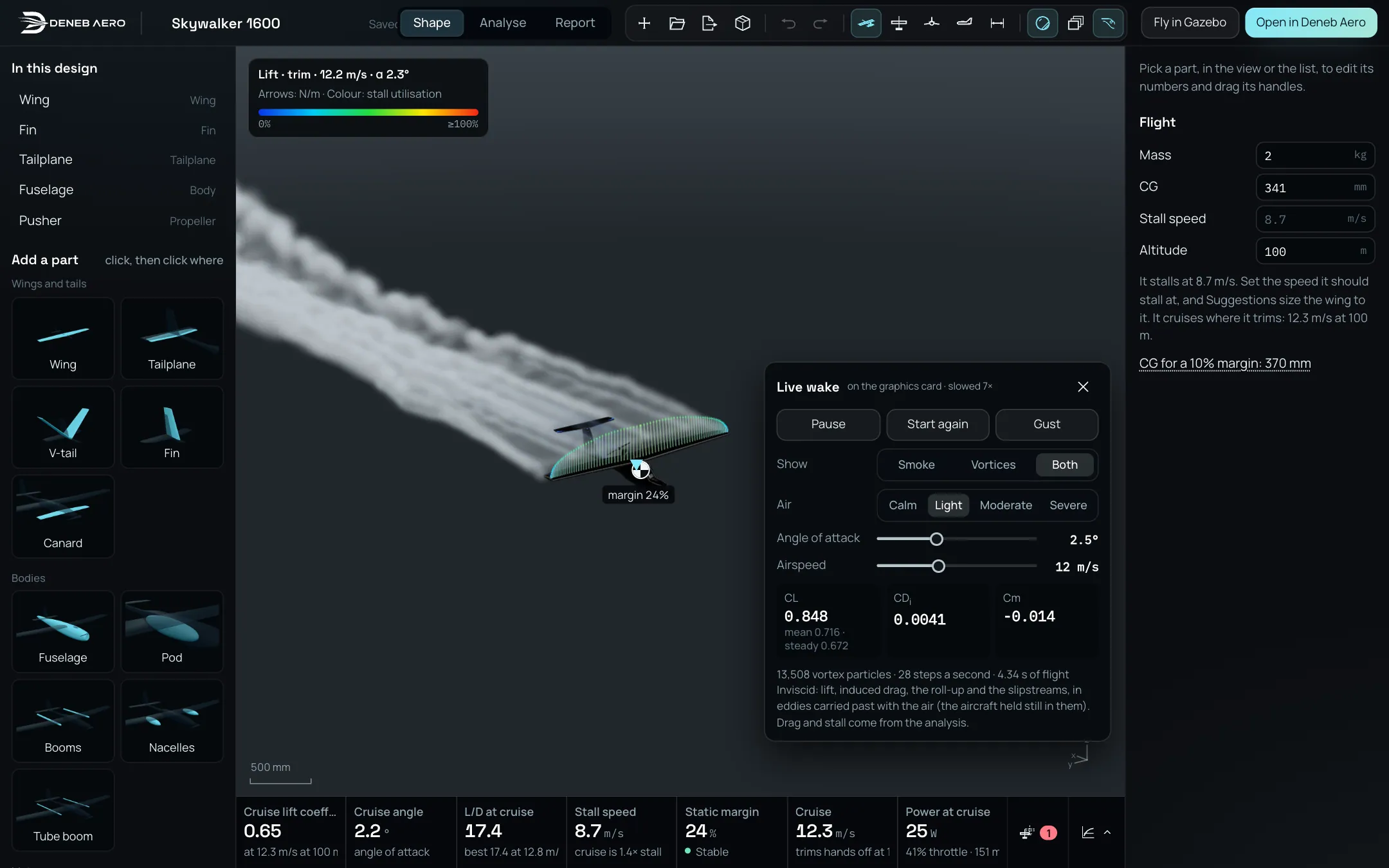
The live wake of a Skywalker 1600 after four seconds of flight in light air.
Opening it
In the Shape mode, select the live wake button in the bar, beside What the view shows. Its tooltip reads Live wake: the lattice marched in time, its wake rolling up. The button is available once the numbers of the aircraft are worked out and the design has a wing or a tail.
The panel opens at the lower right of the view, and the camera pulls back to show the wake. To close it, select the button again or the panel’s close button. The propellers turn while the wake runs, and stop when it closes.
The panel
The title line says where it runs: on the graphics card, or on the processor (shorter wake). It adds slowed … × when the computer cannot keep up with real time.
- Pause / Play
Stops and resumes the wake.
- Start again
Starts the wake again from the aircraft.
- Gust
Sends one gust from below, 3 m/s at its peak, over 0.1 s.
- Flight
Cruise or Hover. Shown only when the aircraft has lift rotors. In hover, the lift rotors hold the weight at no forward speed.
- Show
Smoke (tracers released at the trailing edges, the tips and the propellers, carried by the flow), Vortices (the vortex particles themselves) or Both.
- Air
Calm, Light, Moderate or Severe: the turbulence of the air the aircraft flies through, from still air to gusts of 2.3 m/s. Cruise only.
- Angle of attack and Airspeed
Sliders, starting at the values of the analysis. A new run starts when you let go of a slider. Cruise only.
Under the fields, in cruise, three tiles show the live CL, the induced drag CDi and Cm. Under CL, mean is the average over the last second in gusty air, and steady the value of the steady lattice. In hover a line says the thrust the lift rotors hold. The last line counts the vortex particles, the steps a second and the seconds of flight.
What it needs
The live wake runs best with WebGPU (a current Chrome or Edge, with a graphics card): the wake is then about eight spans long. Without WebGPU it runs on the processor, with a wake of about two spans and longer steps.
What it shows, and what it does not
The live wake marches the vortex lattice of Design in time, with a free wake of vortex particles, and each propeller as an actuator disk with swirl. It gives lift, induced drag, the roll-up of the wake and the slipstreams. It does not give the viscous drag or the stall: those come from the analysis (Analyse and Report) and from a CFD run in Deneb Aero.
The Flow tab of a solved project can draw smoke the same way, from the solved flow (Flow Tab).